

Reporting
Chloe reporting is call reporting and outcome tracking. All reporting centres on what happened on each call and whether those calls are producing the right results across a Voice Agent. Reporting operates at two levels: per-call activity logged on lead records, and per-Voice Agent performance visible in the Calls and Performance tabs.
Where Chloe activity appears in Close
On the lead record
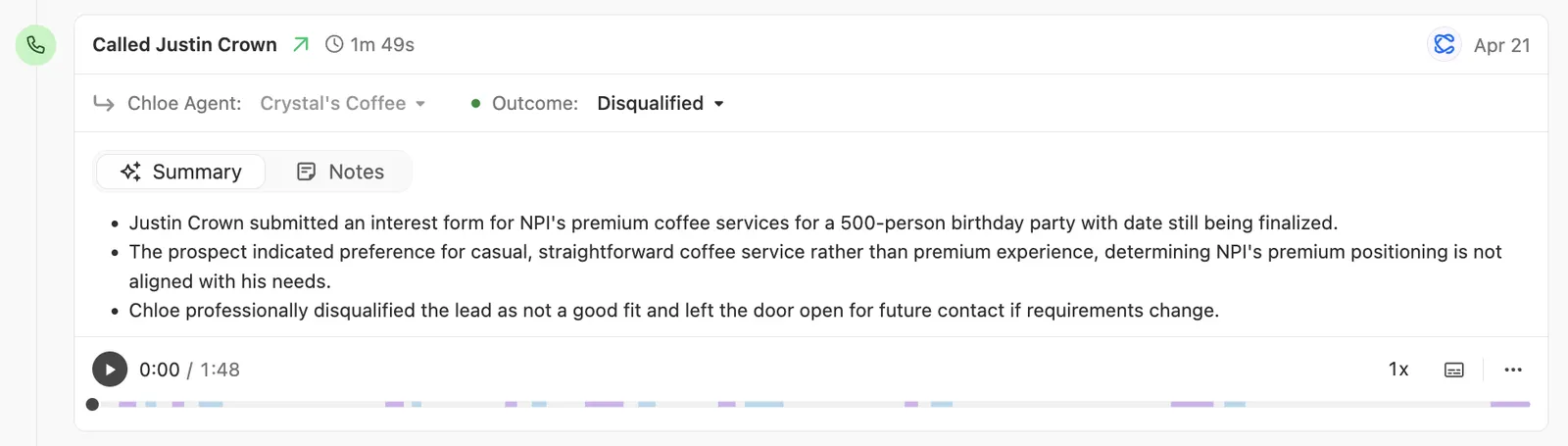
After every Chloe call, Close logs the activity directly on the lead record. Each call entry includes the Voice Agent name, outcome, call summary, notes, recording, speaker breakdown, and a searchable transcript.
Inside each Voice Agent: Calls tab
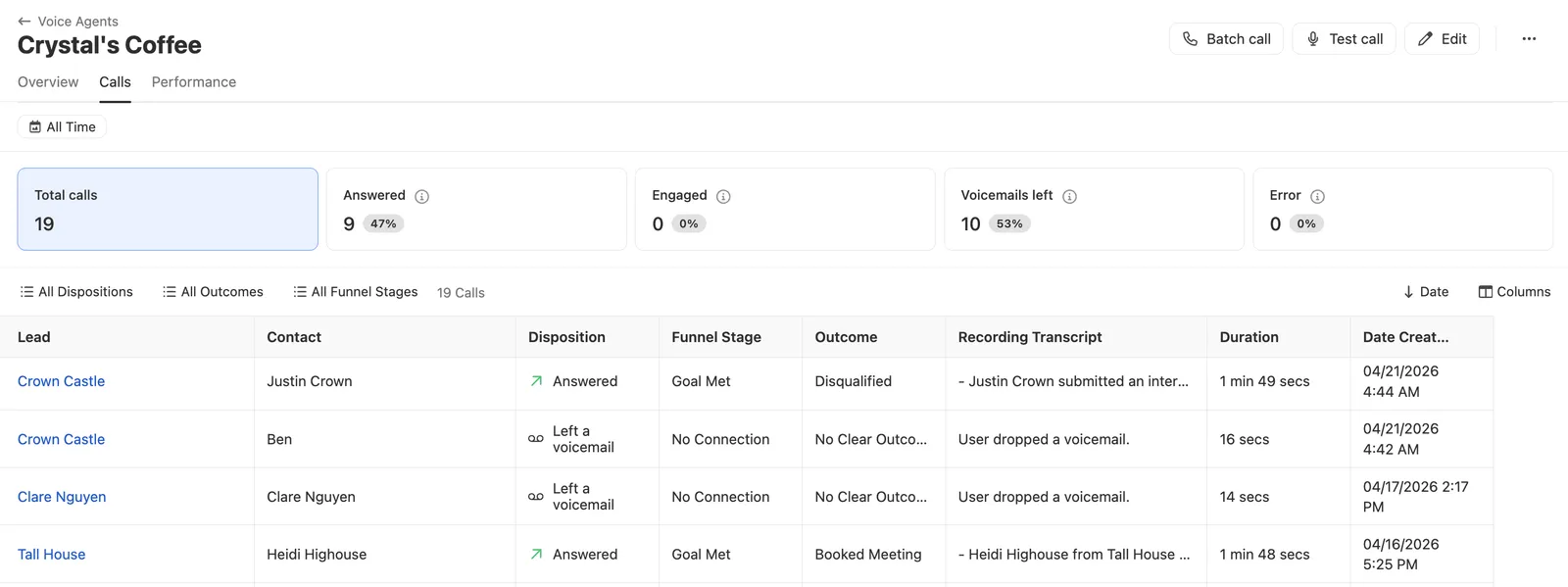
The Calls tab on each Voice Agent is the primary place to review Chloe’s call activity. It shows all calls made by that Voice Agent, with summary stats at the top (total calls, answered, engaged, voicemails left, and errors, each with a percentage). Click any stat to filter the list to that call type.
The call list can be filtered by date range, Disposition, Funnel Stage, and Outcome. Disposition is the technical call result (Answered, Left a voicemail, No answer, Blocked). Funnel Stage shows how far the call progressed (No Connection, Human Reached, or Goal Met). Outcome is the Playbook-defined result Chloe assigned at the end of the call.
Select Engaged at the top to focus on calls where the contact was reached and had a substantive conversation with Chloe. This is the recommended starting point for reviewing call quality.
Performance tab
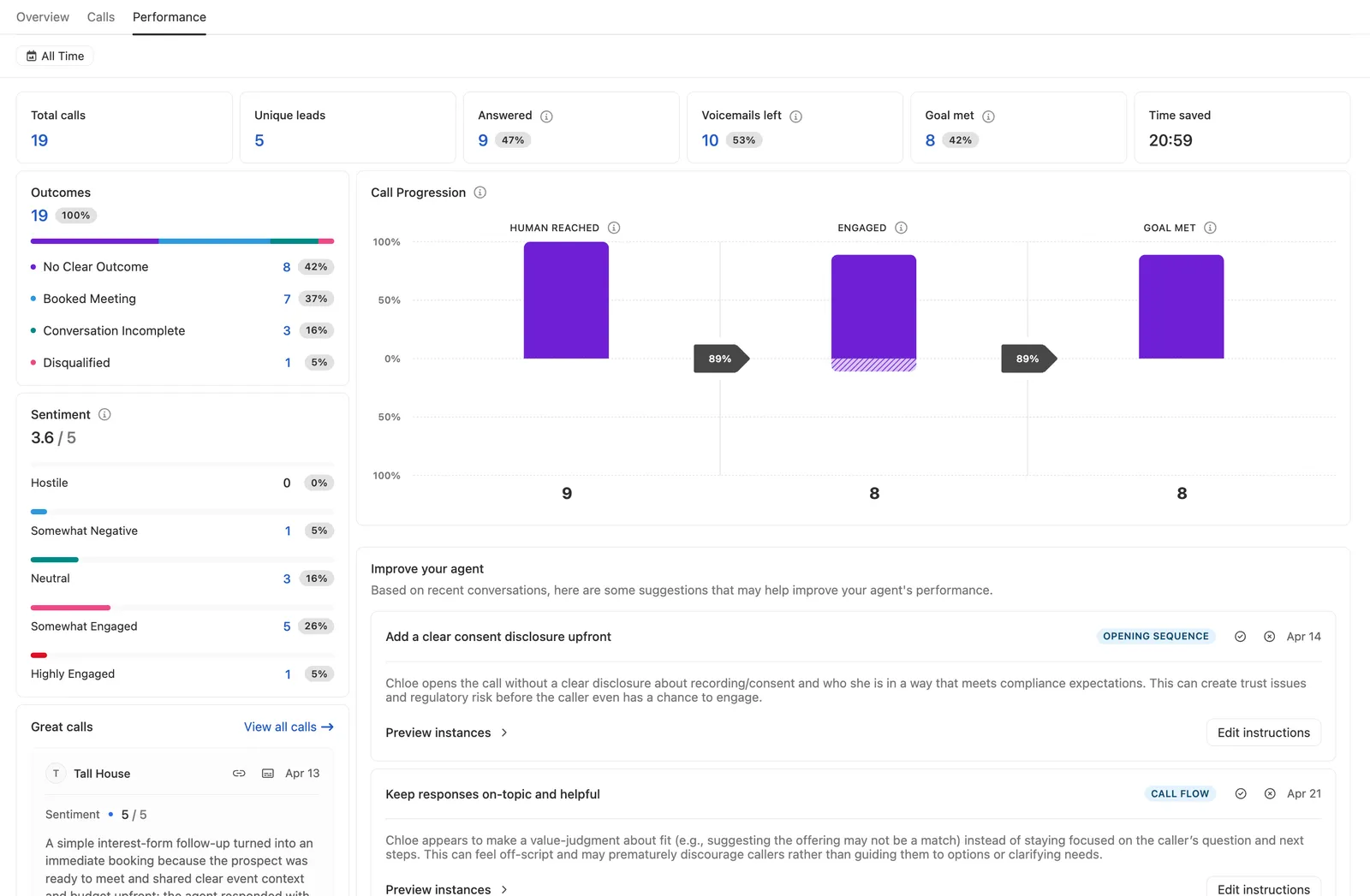
The Performance tab gives you a higher-level view of how a Voice Agent is doing over time, filterable by date range. It’s useful for spotting trends, identifying where calls are falling short, and measuring the impact Chloe is having on your pipeline.
Top-line metrics (total calls, unique leads, Answered, Engaged, Goal Met, and Time saved) give you a quick read on volume and effectiveness.
Below the headline numbers, you can dig deeper:
- Outcomes breakdown — see how calls are distributing across your defined outcomes
- Sentiment — understand how contacts are responding, rated from Hostile to Highly Engaged. A high Hostile rate is an early signal to revisit your targeting or opener.
- Call Progression — a funnel showing drop-off across three stages: Human Reached → Engaged → Goal Met. Use this to identify which stage of the conversation needs work.
- Issue themes — AI-detected recurring problems across calls, grouped by category (for example, Opening Sequence, Call Flow, Question Ignored). Each issue includes example instances from real calls and an Edit instructions link to jump directly to the Voice Agent and make changes. This is often the fastest way to identify what to fix next.
- Great calls — examples of high-performing calls, useful for reference when calibrating what good looks like
What to measure
Volume and coverage
These metrics tell you whether Chloe is reaching enough of your lead list and how those attempts are landing.
Outcome metrics
Outcomes are defined in the Voice Agent’s Playbook and applied automatically based on how each call goes. They are the primary signal for whether a Voice Agent is working.
Interpret outcomes relative to the Voice Agent’s goal and monitor:
- Qualified / disqualified splits
- Callbacks requested
- Meetings booked
- Calls with no outcome applied (indicates the Playbook may need broader outcome definitions)
Business impact
These metrics connect Chloe’s call activity to tangible results. Use them to track whether Chloe is generating interest, moving leads forward, and saving your team time.
- Answered — how many calls connected (Answered is a disposition, and it means the call was picked up, not necessarily that a human spoke with Chloe; see Funnel Stage for Human Reached)
- Unique leads — breadth of coverage across your list
- Time saved — estimated rep time replaced by Chloe calls
Sentiment
The Sentiment score on the Performance tab reflects how contacts responded during calls, rated out of 5 and broken down into five categories:
- Hostile
- Somewhat Negative
- Neutral
- Somewhat Engaged
- Highly Engaged
A low sentiment score or high Hostile rate is an early signal to review your targeting, opener, or tone before scaling call volume.
How to spot problems quickly
How to audit calls
Run this process after the first batch of calls on any new Voice Agent, and periodically thereafter:
- Open the Calls tab on the Voice Agent
- Filter to Engaged calls to focus on conversations where the contact was reached
- Review 5–10 transcripts, looking for patterns in how Chloe handled the conversation
- Identify the most common failure point - where calls went off-track or didn’t reach the goal
- Update the Voice Agent instructions to address that specific issue
- Run a Test Call to validate the change before updating
Repeat after each significant change to the prompt or after scaling volume.