

Chloe Chat
Chloe Chat is the AI assistant built into Close. Ask Chloe about your leads and pipeline, get ready for your day, analyze your data, and take action without leaving the page you’re on.
What Chloe does
- Answer questions about your data: “How many leads did we create last week?”, “What’s the status of my open opportunities?”, “Show me leads with no activity in 30 days”.
- Prepare you for the day: Ask Chloe to look at your meetings for the day and give you a briefing and agenda for each one.
- Help you work your pipeline: Ask Chloe to summarize a lead, find contacts, or surface deals that need attention.
- Draft emails: Chloe can write a draft email for you. She never sends it. You review the draft and send it yourself.
- Make changes in Close: Chloe can create tasks, notes, leads, contacts, and opportunities; update records; and more. She always asks for your approval first. See Actions and approvals.
- Analyze data and build reports: Chloe can pull together data from Close and present it as tables and charts. See Artifacts.
- Answer questions about using Close: Chloe searches the Help Center and your organization’s AI Knowledge Sources to answer how-to questions.
- Manage your Voice Agents: Ask Chloe how your Voice Agents are performing, get recommended changes to their instructions, and schedule Voice Agent calls. See Managing your Voice Agents with Chloe.
- Answer questions about your Close billing: Chloe can show your billing summary, invoices and receipts, and AI credit usage. This requires the Manage Organization permission.
- Contact Close Support: Chloe can send a request to Close Support for you. The request uses the same service as the Contact support form in Close, and Chloe asks for your approval before sending it.
What Chloe doesn’t do
- Send emails or SMS messages: Chloe prepares drafts, and you send them.
- Make phone calls: Voice Agents make calls. Chloe can schedule a call for a Voice Agent to place.
- Search the web: Chloe works with your Close data, your AI Knowledge Sources, and the Help Center.
- Always get it right: Chloe can make mistakes. Double-check important information, and review any change before you approve it.
How to open Chloe
Open Chat from anywhere in Close:
- App header: Select Chat in the app header. If your Close still uses the left sidebar layout, select Chloe > Chat instead.
- Keyboard shortcut: Press Cmd+J (Mac) or Ctrl+J (Windows).
- Ask Chloe buttons: Look for the Ask Chloe button on call, meeting, email, and SMS activities, in the more menu on an opportunity, on upcoming meeting cards, and on the recap card on a Voice Agent’s Performance tab. Selecting it opens Chat with that item added as context.
- Search bar: Type a question into the search bar and select Ask Chloe.
Chat opens as a sidebar on the right side of Close. To change how it appears, select the Change mode icon in the Chat header and choose:
- Sidebar: Chat sits beside the page you’re working on. This is the default, and it needs a browser window wide enough to fit both.
- Minimized: Chat floats over the page. Drag it to move it, or resize it from its edges.
- Maximized: Chat fills the window.
At the top of Chat, select New chat (+) to start a new conversation, Chats to open your history, or Close (X) to hide Chat.
Chat isn’t available if your admin has turned it off or your role doesn’t include Chat. See Managing access to Chloe.
Context awareness
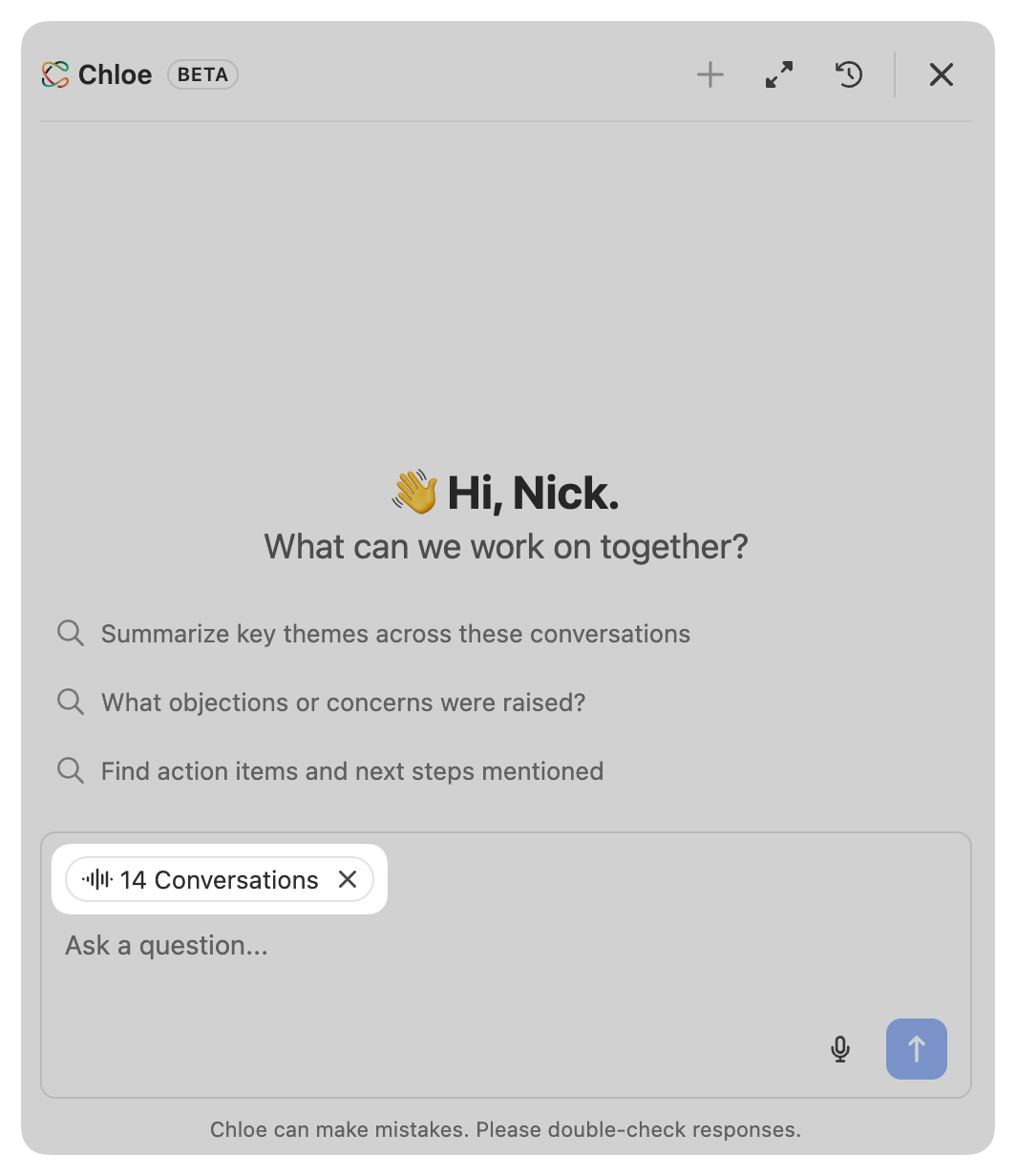
Chloe automatically picks up context from the page you’re on, so she already knows what you’re looking at:
- Lead page: the lead you’re viewing.
- Smart Views and shared views: the Smart View or shared view you have open on the Leads, Contacts, Opportunities, Activities, or Form submissions pages. See Lead Filtering and Smart Views.
- Conversations: the conversations you’re viewing.
- Voice Agent pages: the Voice Agent, along with the date range and filters you’ve set on its Overview, Calls, or Performance tab.
You can also add context yourself. Select Ask Chloe on a call, email, SMS, meeting, or opportunity to add it to your chat. Add several items to a single chat to ask Chloe about all of them at once.
Context appears as tags above the message box, so you can see exactly what Chloe can see before you send your message. When you send a message, its context tags stay visible above it in the conversation.
When you start a new chat, Chloe may suggest prompts based on your current context. Select one to send it.
Actions and approvals
Chloe can read and analyze your data on her own, but she asks for your approval before she changes anything. When Chloe wants to create, update, or delete something in Close, an approval prompt appears in the chat, for example “Allow Chloe to create a task?” Review what she’s about to do, then choose:
- Allow: approve this action once.
- Allow for this session: approve this type of action for the rest of the chat. For example, if you choose this for creating a note, Chloe won’t ask again each time she creates a note in that chat.
- Deny: Chloe doesn’t take the action, and the conversation continues.
Chloe waits for your decision before she carries on. Approvals apply only to the chat you’re in. When you start a new chat, Chloe asks again.
What needs approval
- Creating, updating, or deleting records such as leads, contacts, opportunities, tasks, notes, comments, custom activities, Smart Views, statuses, pipelines, and email and SMS templates.
- Creating a Workflow, enriching a field, updating a Voice Agent, and scheduling a Voice Agent call.
- Merging leads.
- Sending a request to Close Support.
What doesn’t need approval
- Searching, reading, and summarizing your data.
- Building tables and charts.
- Writing a draft email. Chloe never sends it.
- Opening pages in Close for you.
Chloe uses your permissions. She can only see and change what you can, and your admin can limit her further. See Managing access to Chloe.
Artifacts
Artifacts are things Chloe creates for you that you can share with your team.
Tables
When Chloe builds a table from your data, you can open it in full, sort it, export it, and share it with your team.
Previewing in the chat
Tables appear in the chat as a preview of the first 10 rows. Select Show more rows to see up to 25 rows without leaving the chat.
Opening a table in full
Select See table in full, or the Maximize icon, to open the whole table in a panel beside the chat. You can scroll through every row, sort by any column, and resize columns. Your browser window needs to be wide enough to fit the table and the chat side by side.
From the table toolbar you can:
- Copy link: copy a link to the table so you can share it.
- Export to CSV: download the table as a CSV file.
- Save as Smart View: save the table as a Smart View. This is only available for tables that show a filtered list of your leads, contacts, opportunities, or activities.
- View in search results: open the same filtered search in Close. This is only available for those tables.
Sharing and updating tables
When you open a table in full or copy its link, Chloe saves it as an artifact. You can return to it and share it:
- Anyone with the link who has access to your organization can open the table. Saved tables are read-only, and viewers can sort the table and export it to CSV.
- A saved table is a snapshot. It doesn’t update when your data changes.
- To change a saved table, ask Chloe, for example “add a column for the last contact date”. She saves your change as a new version, and you need to share the new version again.
Managing your Voice Agents with Chloe
Chloe can help you keep an eye on your Voice Agents by analyzing their performance and suggesting changes.
- Review performance: Ask Chloe about the calls a Voice Agent made, its outcomes, and how it performed over a time period. Chloe can pull the Voice Agent’s overview and performance reports, its performance recap, and call transcripts. When you open Chat on a Voice Agent’s Overview, Calls, or Performance tab, Chloe already knows which Voice Agent and date range you’re looking at.
- Recommend and apply changes: Ask Chloe how to improve a Voice Agent. She prepares a proposed update and shows you what would change, and she applies it only after you approve. Chloe can update a Voice Agent’s instructions, company details, voicemail message, pronunciation rules, and which skills are turned on. If you wait a long time before approving, ask Chloe to prepare the update again. Applying an update requires the Manage Voice Agents permission.
- Schedule a call: Ask Chloe to schedule a Voice Agent call to a contact. After you approve, Chloe creates a Call Task assigned to the Voice Agent, and the Voice Agent places the call. The contact needs a phone number, and you need the Manage Chloe Call Tasks permission.
Chloe can’t create, delete, activate, or deactivate a Voice Agent, set up phone numbers, run test calls, or start a batch call. Use the Voice Agents page for those. To learn more, see Voice Agent Setup and Using Voice Agents.
How Chloe differs from Voice Agents and Custom Agents
Chloe works with you. She acts only when you ask in Chat and checks with you before changing anything. Voice Agents and Custom Agents work for you, running on their own when a schedule, CRM event, Workflow, or batch call triggers them.
Chat history
Each conversation is saved as a chat. To view or continue a previous conversation, select the Chats icon in the Chat header, then select a chat to reopen it.
- Chats are grouped by date, with the newest first: Today, Yesterday, Previous 7 Days, Previous 30 Days, and then by month.
- Chloe titles each chat automatically based on what you talked about.
- Your chats are private to you. Other users in your organization can’t open them.
- To start a fresh conversation, select New chat (+) in the Chat header.
- If you close Chat and open it again more than 10 minutes later, Chloe starts a new chat. Your previous chat stays in your Chats list.
Notifications
Chloe lets you know when you have unread messages. A chat becomes unread when Chloe finishes a response while you’re away, or when she’s waiting for your approval.
- A badge with the number of unread chats appears on the Chat button in the app header, or on Chat in the left sidebar.
- When you open Chat, a banner tells you how many unread messages you have from Chloe. Select View to jump to them.
- In your Chats list, a green dot marks each chat with an unread message. Select Mark as read to clear all notifications at once.
A chat is marked as read once you’ve seen Chloe’s latest reply. If you close Chat while Chloe is working, she keeps going, and you’ll see her reply as an unread message.
Sharing feedback
Under each Chloe response you can:
- Select the copy icon to copy the response.
- Select the thumbs up icon (Good response) or the thumbs down icon (Bad response) to rate it. Your rating is submitted right away.
If you select thumbs down, a form opens so you can tell us more. Select what went wrong, such as an inaccurate answer, an unhelpful answer, missing information, an irrelevant answer, a question the assistant didn’t understand, or a response that was too slow or didn’t finish. You can also add details in your own words. Select Submit to send it.
Feedback goes to the Close team and is used to improve Chat. To report a problem with your account, ask Chloe to contact Close Support for you, or email support@close.com.
Managing access to Chloe
Admins control who can use Chat and what Chloe can do on their behalf. Chloe always works with the permissions of the person she’s chatting with. She can only see and change what that person can see and change in Close.
Chat is available on all Close plans and is on by default for every organization.
Turn Chat on or off for your organization
Users with the Manage Organization permission can turn Chat on or off for everyone:
- Go to Settings > Billing > AI Credit Usage.
- Under AI Feature Management, find the Chloe Chat card.
- Turn Chat on or off.
When Chat is off, the Chat button, the keyboard shortcut, and every Ask Chloe button are hidden.
Control access by role
Go to Settings > Organization > Roles & Permissions and find the Chloe group. See Roles & Permissions for more on roles.
- Chat: Controls whether users with the role can use Chat.
- Tool access: When Chat is on, this controls what Chloe can do for users with the role.
- Read only: Chloe can search and read data, but can’t make changes.
- Read & write: Chloe can also create new records.
- Read, write, and delete: Chloe can also update and delete existing records.
The predefined Admin, Super User, and User roles have Read, write, and delete tool access. The Restricted User role has Read only tool access. Custom roles are available on the Scale plan. On other plans, assign one of the predefined roles or turn Chat off for the organization.
Other permissions
Some things Chloe can do depend on other permissions. If you ask for something you don’t have permission for, Chloe tells you.
Credits and usage limits
Chat is included with your Close plan. Usage is based on how much work Chloe does for your requests, not on how many messages you send.
To keep Chat fast for everyone, there’s also a limit on how many requests you can send in a short period. If you see a rate limit message, wait a moment and try again.
Paid account usage limits
- Each user gets a free weekly usage allowance for Chat. Allowances reset every Sunday at 12:00 AM UTC.
- After a user uses their allowance, Chat keeps working if your admin allows Chat to use your account’s AI credits. If your admin doesn’t allow it, Chat is unavailable for that user until the allowance resets.
- If your account has no AI credits left, Chat is unavailable for users who have used their allowance until more credits are added or the allowance resets.
For admins
- To let Chat keep working after the free allowance, go to Settings > Billing > AI Credit Usage, find the Chloe Chat card, and turn on Allow AI credit balance usage for Chat.
- To see Chat usage, check Usage by feature on the same page. See AI Credits for more.
Trial account usage limits
Trial accounts have a daily usage limit instead of a weekly allowance. The limit applies to each user and to your trial account overall, so everyone on your team shares the account limit.
- Daily limits reset every day at 12:00 AM UTC.
- When you reach the limit, a message above the message box tells you when it resets in your local time. Chat is unavailable until then.
- Chat doesn’t use your trial’s AI credits.